
The best way to remove WinZip from your system is to use the appropriate feature in the Apps and Features (or Control Panel) depending on the operating system installed.
If you do not find WinZip listed in your Apps and Features/Control Panel, information stored in the registry must have somehow become deleted. In this case, please check the related article about the manual uninstallation of the WinZip.
NOTE: Before uninstalling WinZip Courier you should close all running instances of:
- Microsoft Outlook
- Microsoft Word
- Microsoft Excel
- Microsoft PowerPoint
Windows 8.1, Windows 10, and above
- Right-click the Start button and choose Apps and Features (or Programs and Features)
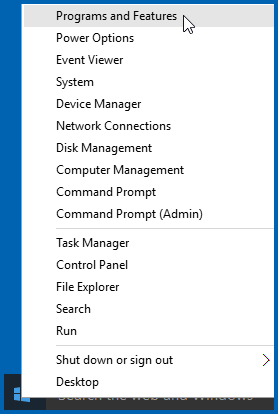
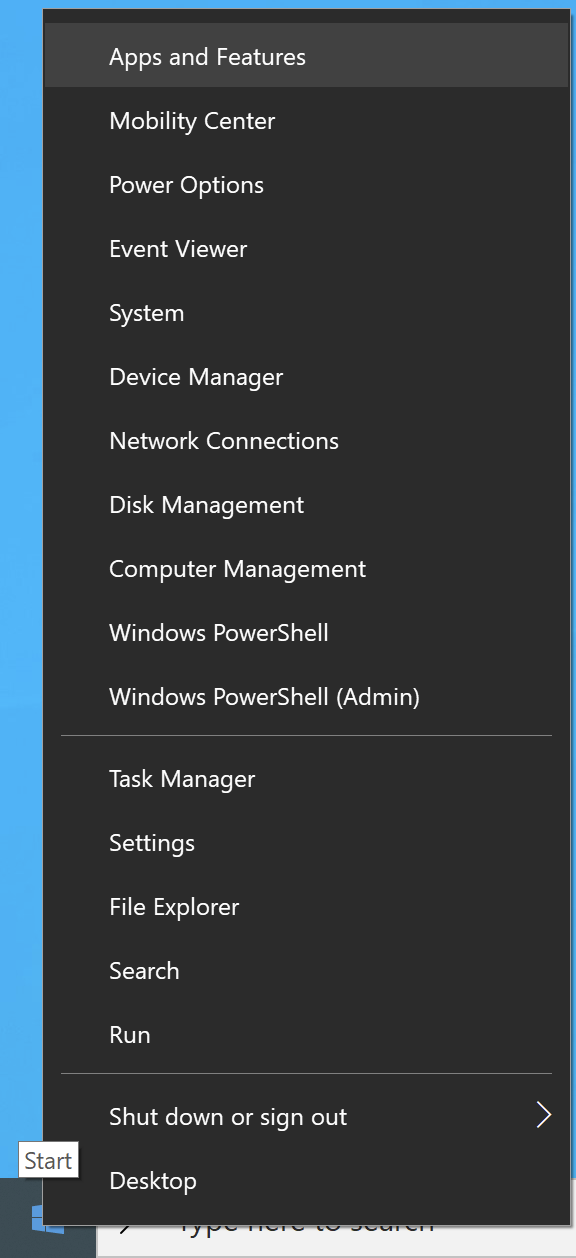
- Click the WinZip entry that is listed
- Click Uninstall
- Click Yes in the User Account Control dialog if it displays
Windows 8.0
Note: Windows 8.1 users have the option to use this method as well.
- Open to or change to the Start menu screen
- Begin typing Control Panel
- Click on Control Panel when it displays
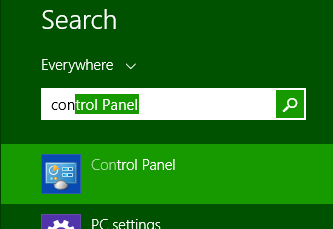
- Click Uninstall a program beneath Programs
Note: If you are not using the Category view, open Programs and Features
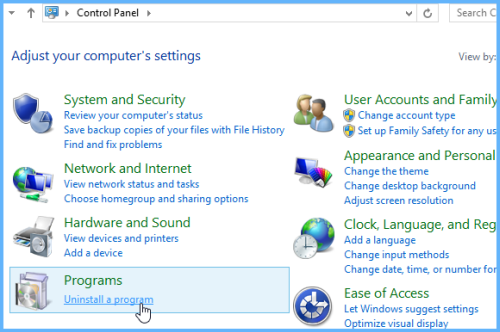
- Click the WinZip entry that is listed
- Click Uninstall
- Click Yes in the User Account Control dialog if it displays
Windows 7
- Click Start and choose Control Panel
- Click Uninstall a program beneath Programs
Note: If you are not using the Category view, open Programs and Features
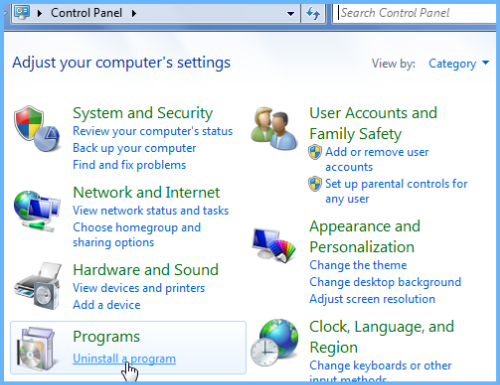
- Click the WinZip entry that is listed
- Click Uninstall
- Click Yes in the User Account Control dialog if it displays
macOS
- Launch WinZip for Mac
- From the menu bar click on the WinZip app menu and select Uninstall... from the drop-down menu
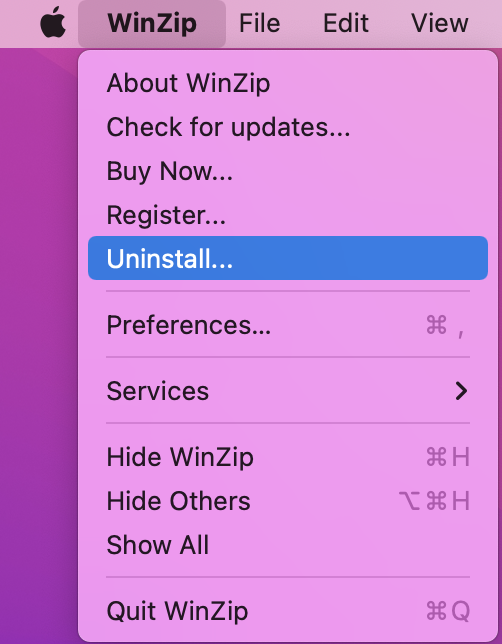
- Follow on-screen instructions to finish the process.
Manually uninstalling WinZip
If you are not able to uninstall WinZip using the appropriate Control Panel feature, you may be able to uninstall manually. Uninstall issues can occur for a variety of reasons. It is even possible that you will not find WinZip in the list of programs that can be uninstalled.
You may want to refer to some of the information in Command Line Basics when following these instructions.
To uninstall manually:
Note: Steps 1-4 only apply to versions 19 and 20.
- On the keyboard, press
 (the Windows key)+R to open Run
 - Copy and paste the following into Run:
C:\ProgramData\Microsoft\Windows\Start Menu\Programs\Startup - Click OK to open the All User's Startup folder
- Delete the following shortcut files if they are present: FAH, Update Notifier, WinZip Previewer
- Open the WinZip folder, usually in C:\Program Files
Note: If you have a 32-bit version of WinZip on a 64-bit version of Windows, you will need to open C:\Program Files (x86) - Select and delete the Utils folder
- Click Continue in the Access Denied dialog, if it displays
- Press CTRL+A on the keyboard to select all of the WinZip program files
- Right click anywhere in the highlighted area and choose Properties
- Click the box next to Read Only until it is clear (no check mark, not colored)
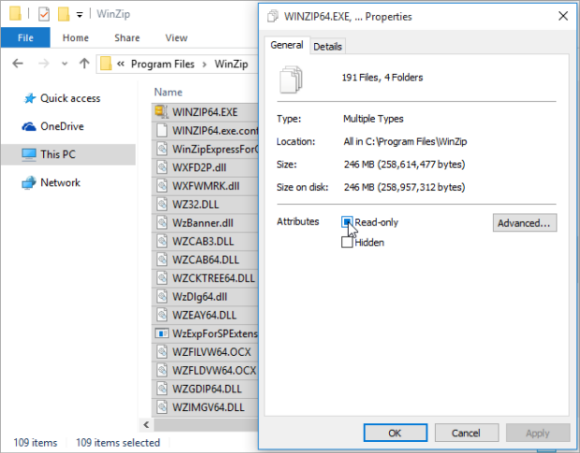
- Click OK
- Select the radio button next to "Apply changes to the selected items, subfolders and files" in the Confirm Attribute Changes dialog
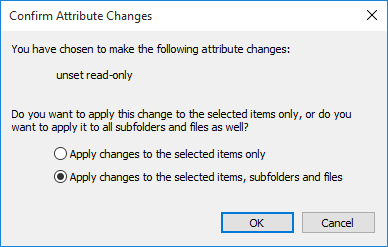
- Click OK
- Click Continue in the Access Denied dialog, if it displays
- Right click Start and choose Command Prompt (Administrator)
For Windows 7, you will need to find Command Prompt on the Start menu, right click, and choose Run as administrator - In the Command Prompt window type the appropriate line below (32-bit WinZip or 64-bit WinZip):
"%ProgramFiles%\WinZip\winzip32" /uninstall
"%ProgramFiles%\WinZip\winzip64" /uninstall
For a 32-bit WinZip on a 64-bit system, use:
"%ProgramFiles(x86)%\WinZip\winzip32" /uninstall - Press Enter on the keyboard
- Respond to the dialogs that display to uninstall WinZip
- Restart your computer
- Delete the WinZip folder in the Program Files folder (removing all remaining files and subfolders)
If WinZip was on the uninstall list when you first tried uninstalling, continue with the steps below.
- On the keyboard, press (the Windows key)+R to open Run
- In the Run dialog type: regedit and click OK, which will open the Registry Editor
- Click Yes in the User Account Control dialog (if necessary)
- Browse to: HKEY_LOCAL_MACHINE\SOFTWARE\Microsoft\Windows\CurrentVersion\Uninstall\
{CD95F661-A5C4-44F5-A6AA-ECDD91C240??}Note: The last two characters are represented by question marks. The actual characters vary by WinZip version. Each backslash represents the end of an item. Start by clicking the triangle next to HKEY_LOCAL_MACHINE, then the one next to Microsoft, until you reach {CD95F661-A5C4-44F5-A6AA-ECDD91C240??} - Click on {CD95F661-A5C4-44F5-A6AA-ECDD91C240??} to display its contents in the right pane of the Registry Editor and make certain that the DisplayName string value shows this to be WinZip
- After clicking {CD95F661-A5C4-44F5-A6AA-ECDD91C240??} to select it, press Delete on the keyboard
- Respond to the warning dialog that displays and close the Registry Editor
Was this article helpful?
Tell us how we can improve it.