
| Note: If you do not have an email application that supports simple MAPI, you can use WinZip's emailer. For more information, see KB 125965. |
If your recipient plans to view your photos on-screen and/or does not have the need for professional print quality, you can and perhaps should take advantage of WinZip's resize feature with Zip and E-mail. This will allow you to send multiple photos in one Zip file, and it will neither take forever for your recipient to download it nor will it clog their inbox. It will also be much more convenient for your recipient to download one Zip file rather than several separate attachments.
Basically, you would select your photos, right-click, and choose Zip and E-mail filename.zip (or .zipx).
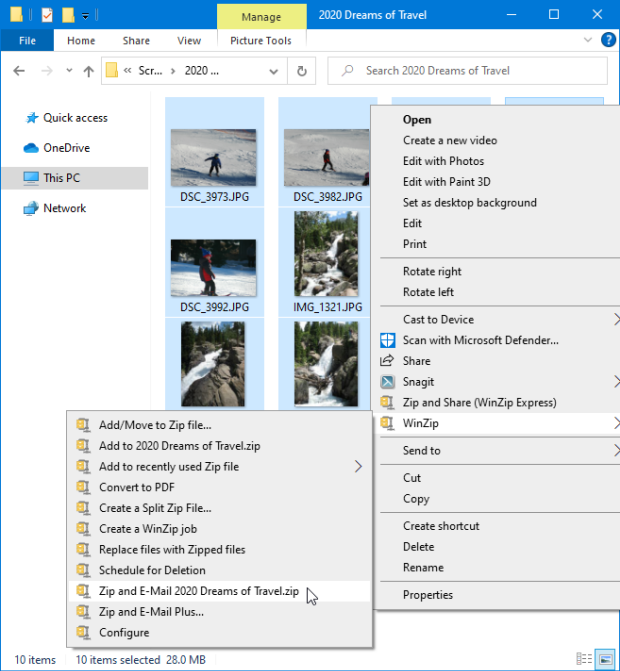
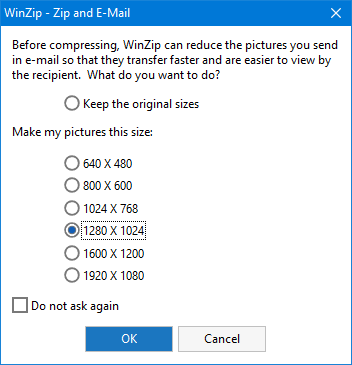
The highlighted photo files in the example total 28.0 MB, which is too large to email! You should now select an alternate picture size.
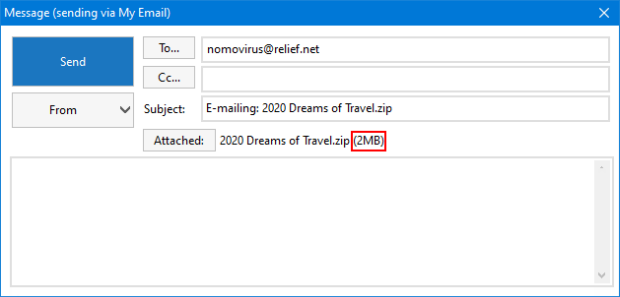
You can see in the example below that the attachment size is now only 2 MB, which you can send without any issues. At this point you can address the message, change or add to the subject (optional), write your email message, and click Send.
You can achieve the same results using WinZip Express for Explorer. Just click Zip and Share (WinZip Express) after you right click your photos and the WinZip Express dialog will open.
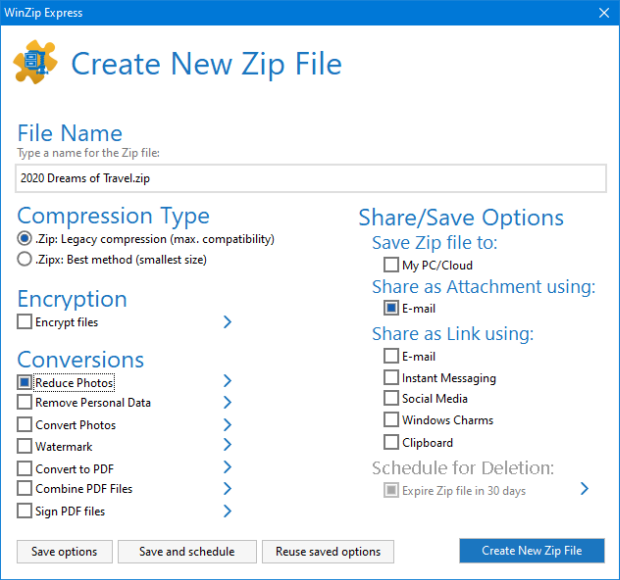
In the WinZip Express dialog, you can type the name you want, click the Reduce photos box, choose at least one thing under Share/Save Options, and then click Create New Zip File to send and/or save your resized images in a Zip file. With WinZip Express, you have many other options available as well, including applying a watermark to your photos. Starting with WinZip 22.5, you can save your WinZip Express options, chose to both save and schedule this action, and reuse options you saved at an earlier time. Scheduling files for deletion is another new option, but is not available here, as the Zip file is being emailed and is not being saved.
If you already have your photos in a Zip file, you can resize and send them by following the instructions below.
- Open the Zip file in WinZip
- Select the photos in the Zip file that you want to send
- Right click in the highlighted area
- Click Send Selected Files To
 Mail Recipient (Zip and E-Mail)
 - Choose your options and click OK
If you are a WinZip Courier user, please see the Attachments Options help page. If you set a preferred size here, WinZip Courier will resize the photos you attach to an email message as it zips them.
As mentioned above, your message will send faster and take up less space in the recipient's inbox when you resize. Also, if the recipient has WinZip Pro, he or she can easily view all the photos without extracting them first!
Was this article helpful?
Tell us how we can improve it.