
| This article is specific to usage of Internet Explorer. As that browser is used much less and since there have been no recent reports of this issue, this article is being maintained as archived information. |
There have been reported and validated instances where a downloaded Zip file will open correctly for some users, while others who download the same Zip file find that it is corrupted. Normally, the best thing to do would be to delete Temporary Internet Files (see below) and download the file again.
However, the issue may not be with the original Zip file. It may be caused by settings on the server where the file is stored. Also, downloading with Internet Explorer may be one of the factors in the issue.
If this Zip file download has not been set with the correct mime-type specification (octet-stream) to denote that it is a binary file, this issue may occur. Another possibility would be that the server is set to always gzip files being downloaded. In either case, gzip encoding, a Unix compression method, is applied to the Zip file and, for whatever reason, Internet Explorer may then have a problem correctly downloading it.
Options would include downloading this file using a different browser, such as Firefox or configuring Internet Explorer so that gzip encoding is disabled. To do the latter (with Internet Explorer closed):
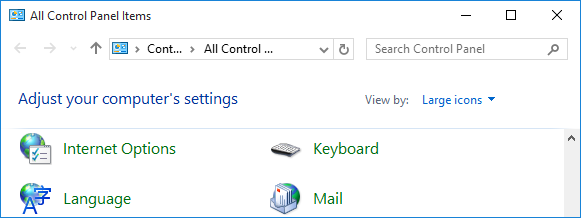
- Click Start and open the Control Panel
- Change the Control Panel view if it is in the Category view
- Open the Internet Options applet
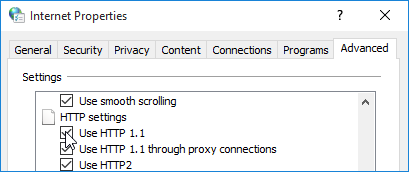
- Click the Advanced tab
- Scroll down to and uncheck the box next to Use HTTP 1.1
- Click OK
Next, you should delete your Temporary Internet Files. To do this:
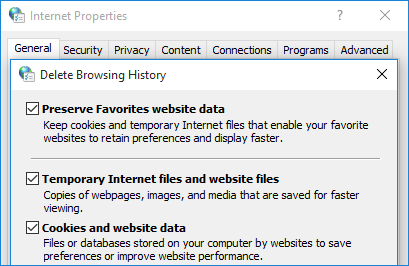
- Open the General tab in Internet Options
- Click Delete in the Browsing history section
- Check or uncheck options; make sure Temporary Internet Files is checked
- Click Delete and then click OK
Once this is done, open Internet Explorer and try downloading the Zip file again.
Was this article helpful?
Tell us how we can improve it.