
When you install WinZip and select Optimize for best compression as the default, the DefaultCompressionMethod string value in HKEY_LOCAL_MACHINE\SOFTWARE\Nico Mak Computing\WinZip\WinZip is given a value of 1. If Legacy is selected the string value recorded is 0.
The installing user will have values propagated from this key in HKEY_LOCAL_MACHINE to HKEY_CURRENT_USER\Software\Nico Mak Computing\WinZip\WinZip during the installation. Other users on the same computer will have these values propagated when they first run WinZip. If the user changes the default compression setting from that which was set at install, a DefaultCompressionMethod string will be written in the corresponding key of his or her HKCU branch with the appropriate value. For example, if you install choosing optimize for best compression the value of DefaultCompressionMethod in HKLM will be 1. If a user then configures this to be Legacy a DefaultCompressionMethod string will be written in HKCU with a value of 0. Otherwise, DefaultCompressionMethod will not be present in HKEY_CURRENT_USER.
Additionally, a ZipCompression string value will be present in HKEY_CURRENT_USER\Software\Nico Mak Computing\WinZip\WinZip with a value of 9 for Best method compression and a value of 0 for Legacy.
Alternate compression method
It is possible to define an alternate compression method for WinZip to use when creating .zip files and an alternate compression method for WinZip to use when creating .zipx files. These options are available in the Zip tab. These compression method settings do not change even after WinZip has been closed. WinZip will continue to use your compression setting until you change it.
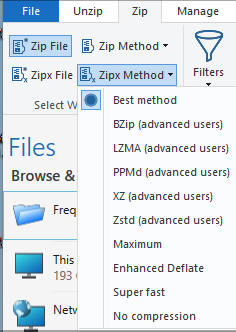
For example, you might change your compression method in this way if you were planning to group a number of highly compressed files (such as multimedia files) together in a Zip file. In most cases highly compressed files will not get appreciably smaller in a Zip file. Grouping files in a Zip file allows you to make a copy of a set of files, possibly in their folders, in a form that is easier to share and/or easier to copy to another disk. However, working with files that are already highly compressed can cause WinZip to "try harder" and take longer if you do not use a different compression option. Since compressing is not the goal in this case, you would want to choose No compression or Super fast to greatly improve WinZip's speed when creating your Zip files.
When you choose a different compression method for your .zip files, WinZip writes a ZipMethod string value in HKEY_CURRENT_USER\Software\Nico Mak Computing\WinZip\WinZip. When you choose a different method for .zipx WinZip writes a ZipXMethod string value in the same key. The following are the values for these strings and the compression methods the values represent:
|
Compression |
Value |
|---|---|
| Best method | 9 |
| bzip2 | 6 |
| lzma | 10 |
| PPMd | 7 |
| xz | 12 |
| Maximum | 0 |
| Enhanced Deflate | 5 |
| Super fast | 3 |
| No compression | 4 |
Note: ZipXMethod can be set to any of these compression methods while ZipMethod is limited to the last 4 (Maximum, Enhanced Deflate, Super fast, and No compression).
Was this article helpful?
Tell us how we can improve it.