
| Note: this article does not include information concerning the email feature in WinZip Jobs. |
WinZip includes features that make it possible for you to compress and email files and folders. While WinZip's various email options are easy to use, underlying issues may interfere. Brief descriptions of the email features will be provided prior to discussing possible causes for issues. These features are:
- Zip and E-mail: Right-click files or folders and click this WinZip option to quickly attach a Zip file to a new email message. If any of the files are photos, you will also be given the option to resize them, which can significantly reduce transmission time.
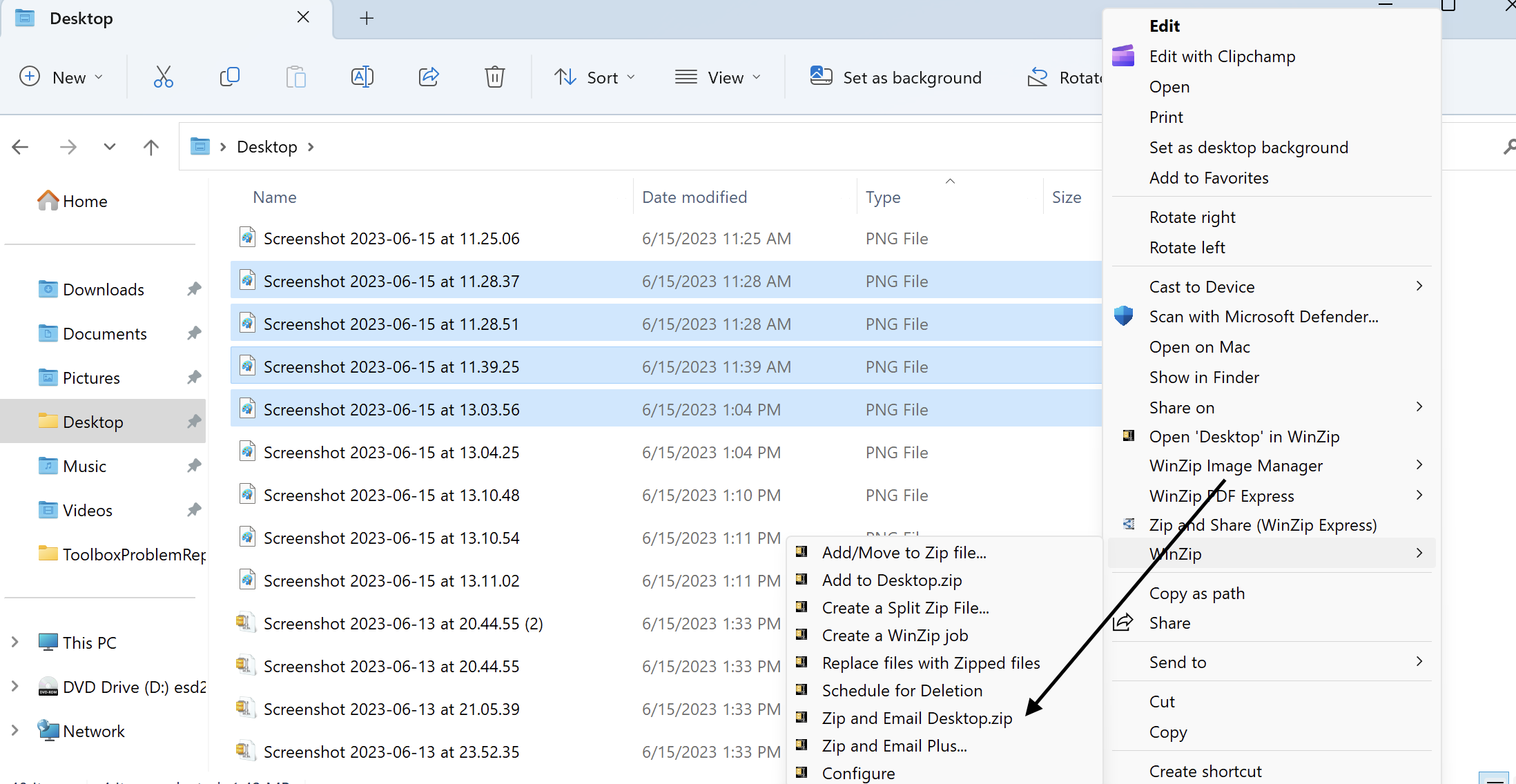
- Zip and E-mail Plus: This works like Zip and E-Mail, but also allows you to specify the name of the Zip file and to add encryption if desired.
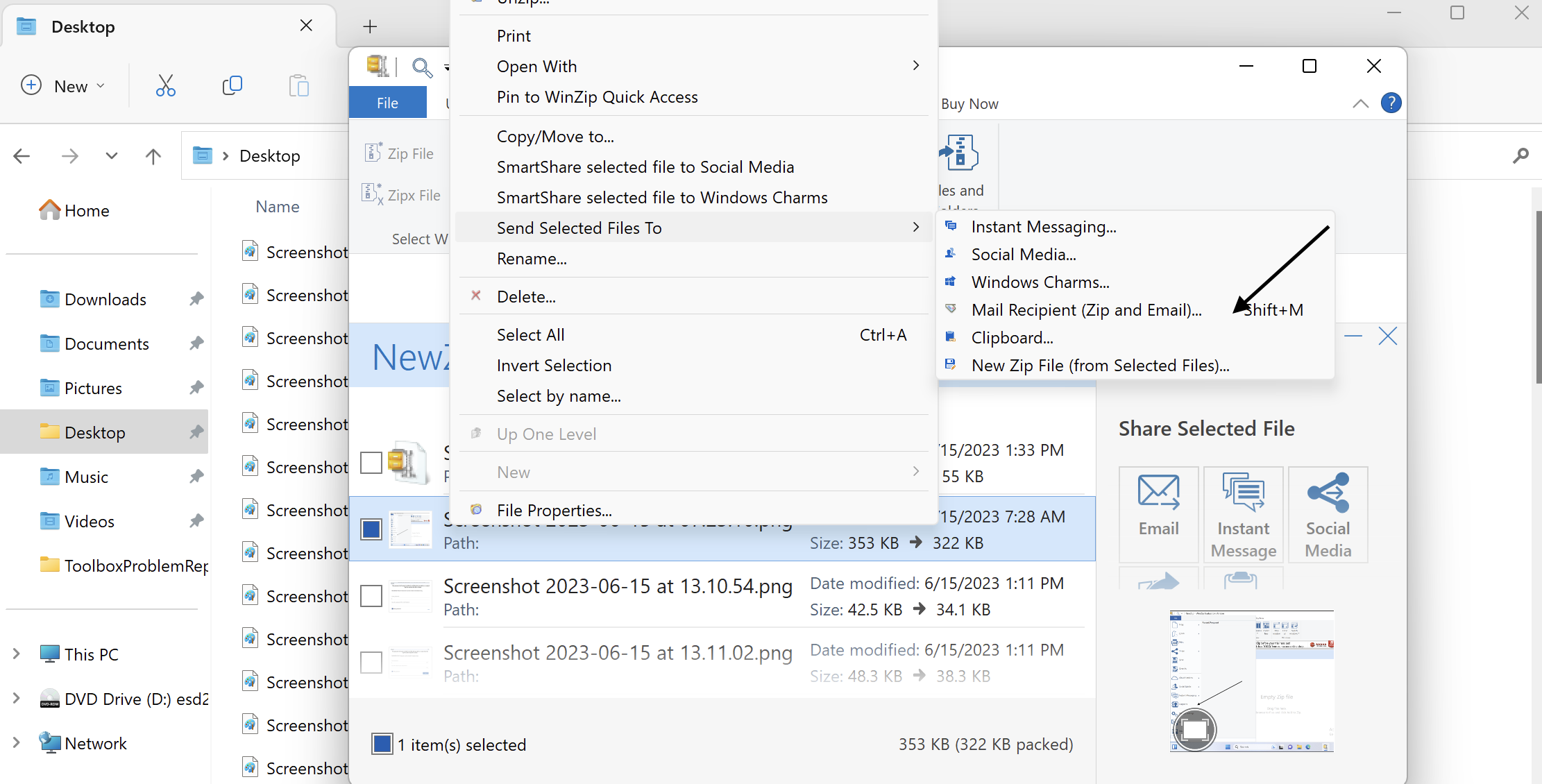
- Email: If you have a Zip file open in WinZip, you can click this button in the Actions pane. If you use the Email button, a copy of the entire Zip file will be attached to a new email message. If you select any files or folders in a Zip file, right click in the highlighted area, and choose Send Selected Files To > Mail Recipient (Zip and E-Mail), WinZip will offer you the option to send only the selected files or the entire Zip file.
Use with a MAPI email program
If you use an email program such as Microsoft Outlook, Thunderbird, or Windows Live Mail as your default email program and if WinZip is configured appropriately, WinZip's email features will work with your email program. What makes this possible is a protocol named MAPI (Mail Applications Program Interface), specifically Simple MAPI. MAPI is a standard Windows interface that allows WinZip and other programs to instruct your email program to create a new message and attach a file to it.
Generally, you would only need to have your email program set as the default and have an email account configured to have simple MAPI working. It is not uncommon for an email program to let you know that it is not set as the default when you open it. Usually, this information dialog will also make it possible for you to set it as the default.
You can also use the Default Programs applet to reset your default email program. To do this:
- Open Default Programs:
-
- Windows 11 / Windows 10:
- Click in the search field at the bottom left
- Begin typing: default
- When Default Programs Desktop App displays at the top of the list, click it
-
- Windows 8:
- Open to or change to the Start menu screen
- Begin typing: default
- When Default Programs displays in results, click it
- Windows 7:
- Click Start
- Click Default Programs on the right side of the Start menu
- Click the link that reads Set your default programs
- Click your email program in the list of Programs
- At the bottom right, click the area that says Set this program as default
- Click OK and close Default Programs
Use with WinZip's built-in email program
If you do not have a MAPI-compatible email application, WinZip will use its own built-in email program. A configuration option is also available if you would rather use the WinZip emailer, even though you do have a MAPI-compatible email program. In the case where there is no MAPI-compatible email program, you can conceivably have WinZip's email features working, but the Send To > Mail Recipient feature used by Windows and other programs will not work, as they rely on MAPI.
You will need to define an email account in the Email tab of the WinZip Options dialog before you use WinZip's built-in email program. Otherwise, you will be prompted automatically when you first try to use one of WinZip's email features.
Was this article helpful?
Tell us how we can improve it.