
When installed on Windows 11, Windows 10 or Windows 8, WinZip allows you to easily access your recently used Zip files and WinZip features using Jump Lists (this does not apply to versions earlier than WinZip 14.0). The WinZip jump list can be used from the Desktop taskbar (or from Start with Windows 10). If you like using either jump list, you can pin it so that it will always be available. Please see the topic entitled WinZip and Jump Lists in the Miscellaneous section of WinZip Help for more detailed information. The help topic includes steps for using various jump list features, how to control the number of items listed on jump lists, and how to clear jump lists of entries.
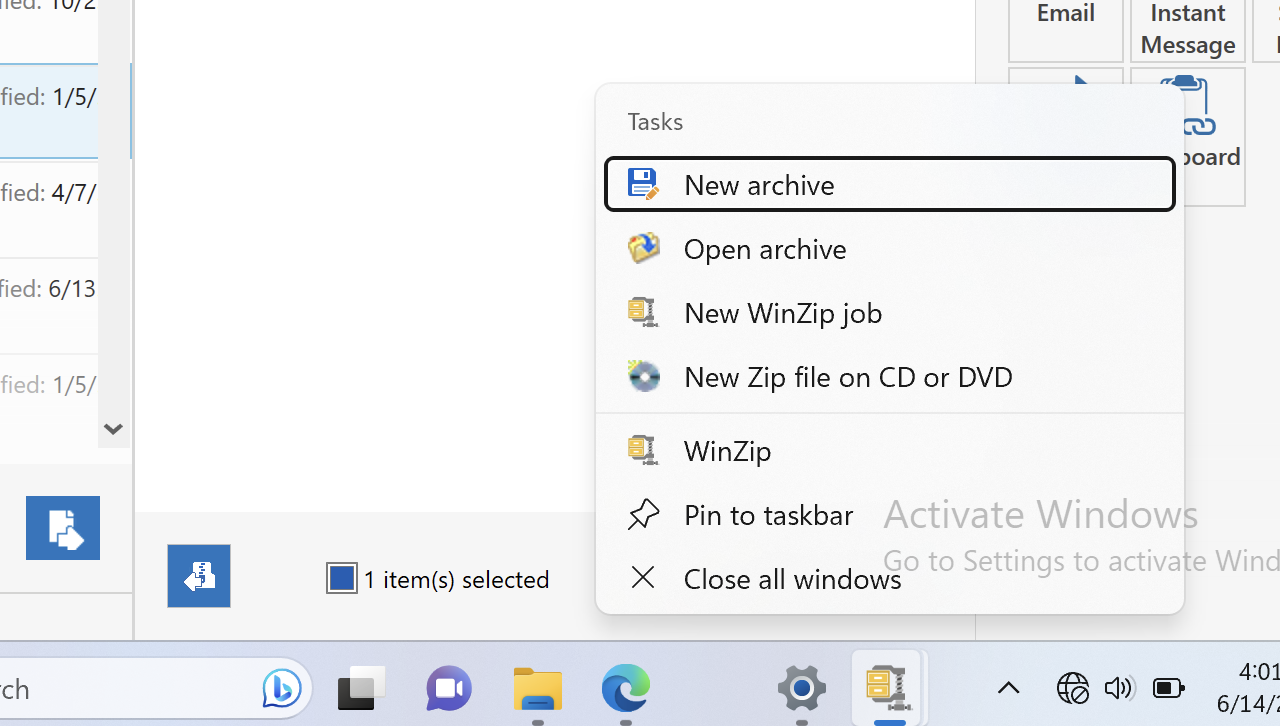
Using the WinZip jump list, you can quickly and easily:
- Open recently used Zip files or other types of WinZip archive files
- Start WinZip (open the program)
- Start WinZip and immediately begin creating a New archive
- Start WinZip and immediately display the Open WinZip File dialog
- Open a favorite file or job that you have pinned to the jump list
- PRO only - Select and run a recently used WinZip Backup (job file)
- PRO only - Start WinZip and immediately begin creating a New WinZip job
- PRO only - Start WinZip and immediately begin creating a New Zip file on CD or DVD
Was this article helpful?
Tell us how we can improve it.